Pay onceno subscription, ever150,000transactions tested in Money Command Center0 uploadsyour numbers stay on your computerData Checkfinds wrong or missing entries for you66 lessonsin the Technical Analysis Study LabInstantdownload right after paymentRazorpaysecure checkout: UPI, cards, netbankingYour currencyrupees, dollars and more
MoneyInBytes - Read your wealth. Write your future. Buy now
Coming soonBilling Studio

GST invoices in a minute. No account, no monthly fee.

Quotations, tax invoices, credit notes and delivery challans for your business, with the GST worked out for you. A clean PDF with your logo, sent by email or WhatsApp, and every number kept on your own computer.

  • CGST and SGST or IGST worked out from the place of supply
  • A PDF with your logo and a UPI QR code, sent by email or WhatsApp
  • Works offline: no account, no cloud, no monthly fee

India only

Coming soon. Look around now: buying opens on this page shortly.

Windows 10/11, nothing to install · Check yours

Billing Studio screenshot
7kinds of document, from quotation to delivery challan
1click to turn a quotation into an invoice, or an invoice into a credit note
30daily backups kept for you, automatically
0uploads: no account, no cloud, no tracking

Please note: Billing Studio makes GST documents and summaries. It does not file returns and gives no tax advice: check rates and returns with your CA.

The problem

Billing should not take your evening

  • Invoices typed in Word or Excel, with the GST worked out by hand and a total that sometimes does not match.
  • Inter-state or intra-state, which rate, which HSN: one mistake and the client sends the bill back.
  • Who has paid, who is late and what to give the CA at the end of the month is spread across papers and chats.
The answer

Billing Studio

Billing Studio does the GST maths, numbers every document in order, makes the PDF and keeps track of what is paid, so a bill takes a minute and the month-end summary is one click.

See how it works
Inside the product

Real screens. Real features.

Every picture below is a screen from Billing Studio with its demo data. Click one to see it full size.

Billing Studio: Tap your items, the totals follow
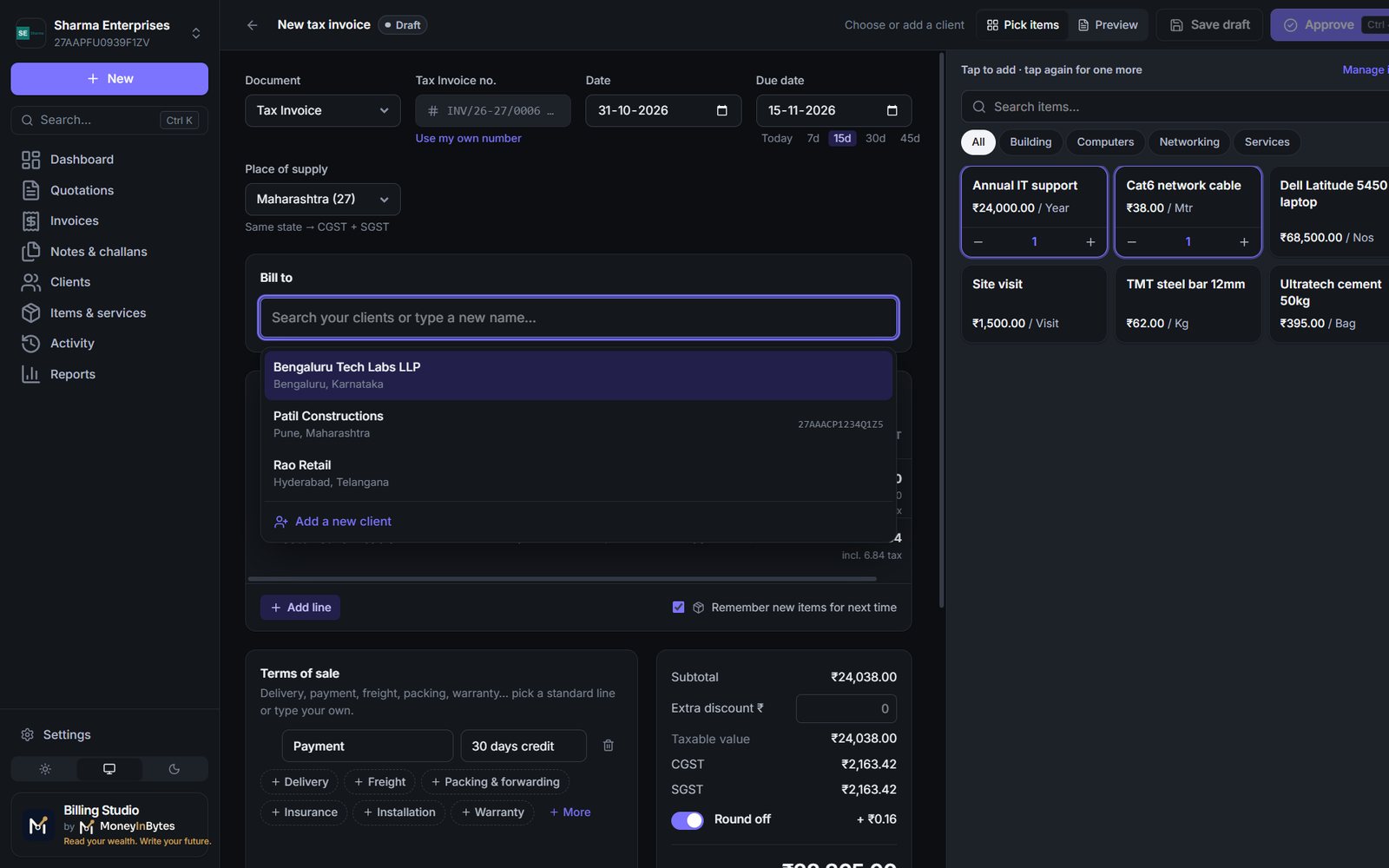
New invoice

Tap your items, the totals follow

Pick the client, tap the items you sell and the quantities; the taxable value, CGST and SGST or IGST, discount and round-off are worked out as you go.

  • Place of supply decides CGST + SGST or IGST
  • Your items and clients are remembered for next time
  • Terms of sale in one tap: delivery, payment, warranty
Billing Studio: A tax invoice your clients take seriously
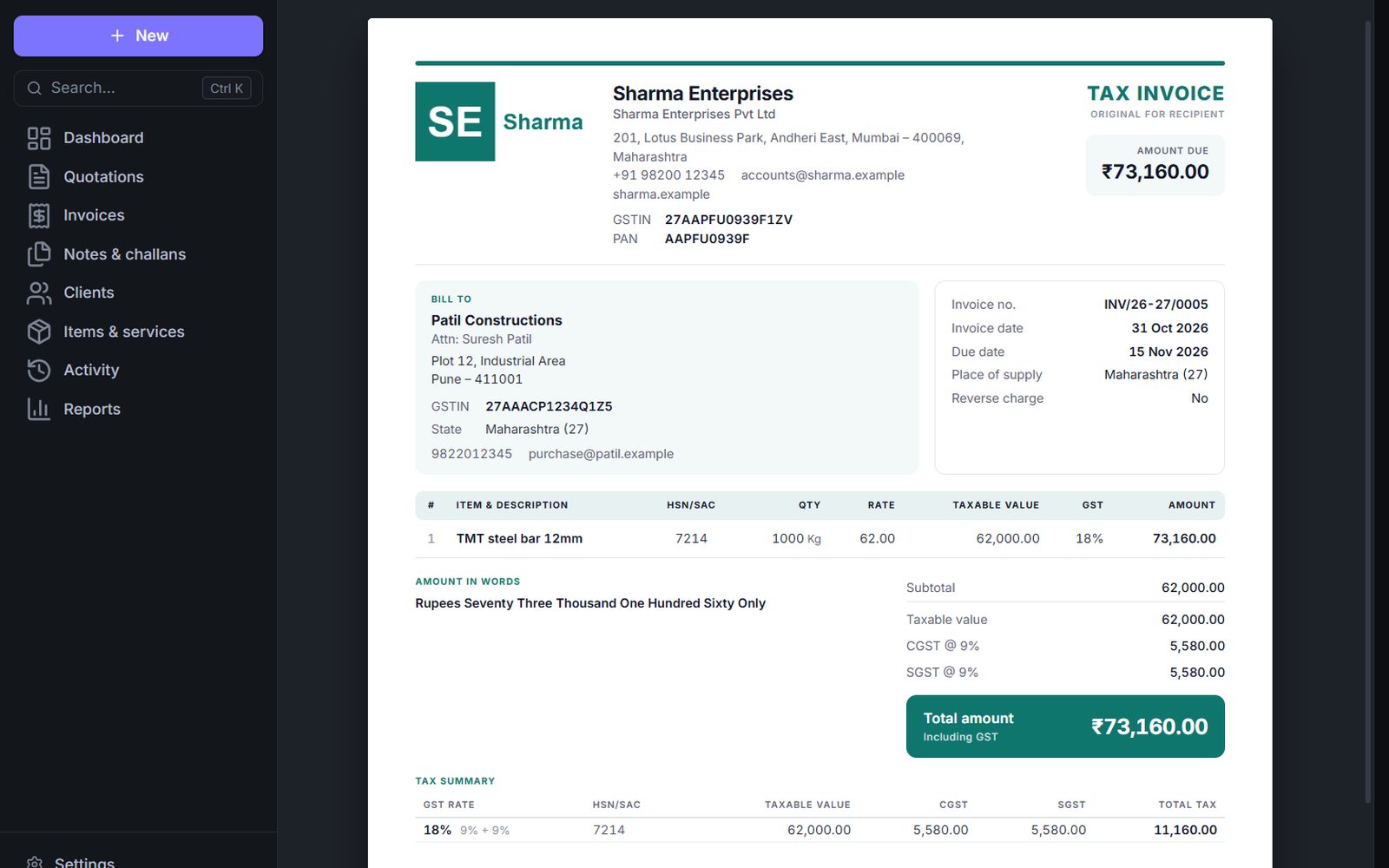
The PDF

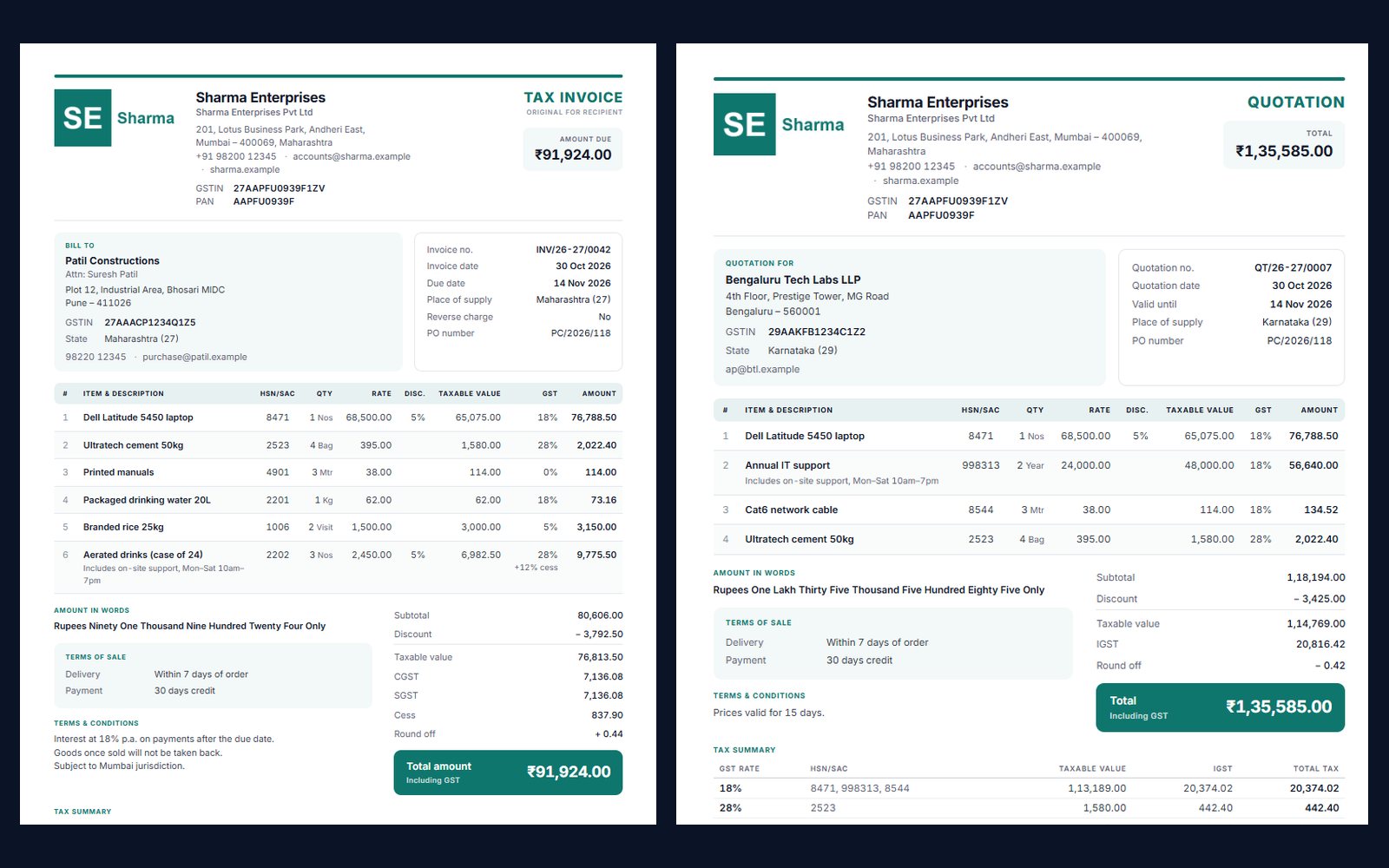
A tax invoice your clients take seriously

Your logo, GSTIN, the client's GSTIN and state, HSN or SAC per line, the amount in words and a tax summary, on one clean page.

  • Several styles and your own colour
  • Bank details and a UPI QR code to get paid faster
  • Original for recipient, numbered by financial year
Billing Studio: Mixed rates, cess, discounts and other states
GST done right

Mixed rates, cess, discounts and other states

Several rates on one bill, cess on top, a discount on some lines, a client in another state: each line is taxed correctly and the tax summary adds it up by rate.

  • Every GST rate, 40% included, plus cess
  • IGST for clients in other states
  • GSTIN checked as you type it
Billing Studio: From quotation to invoice in one click
Quotations

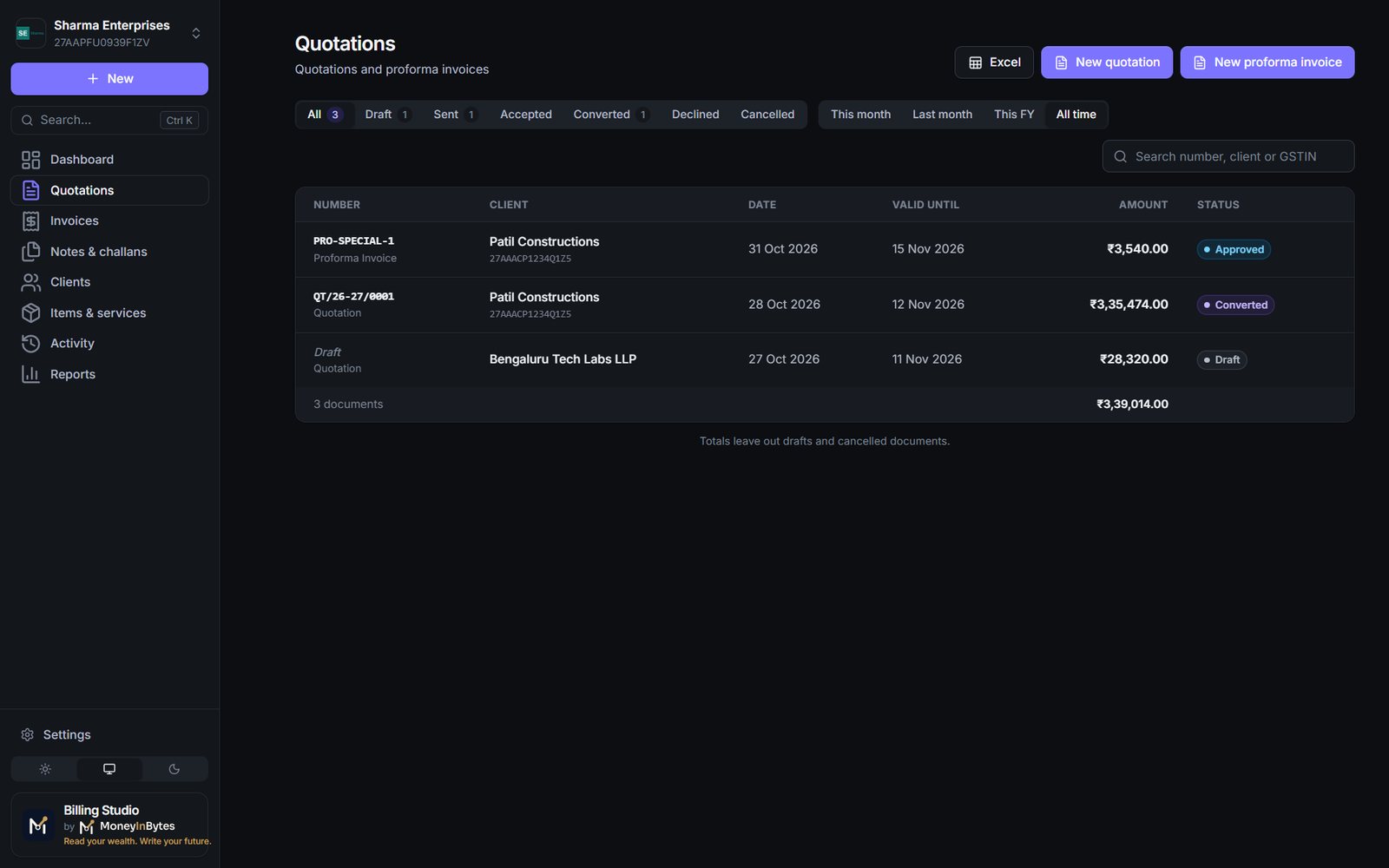
From quotation to invoice in one click

Send a quotation or a proforma invoice, mark it accepted or declined, and convert the accepted one into a tax invoice without typing it again.

  • Valid-until dates and follow-ups
  • Drafts get a number only when you approve them
  • Every step kept in a permanent history
Billing Studio: Credit notes, debit notes and delivery challans
Notes and challans

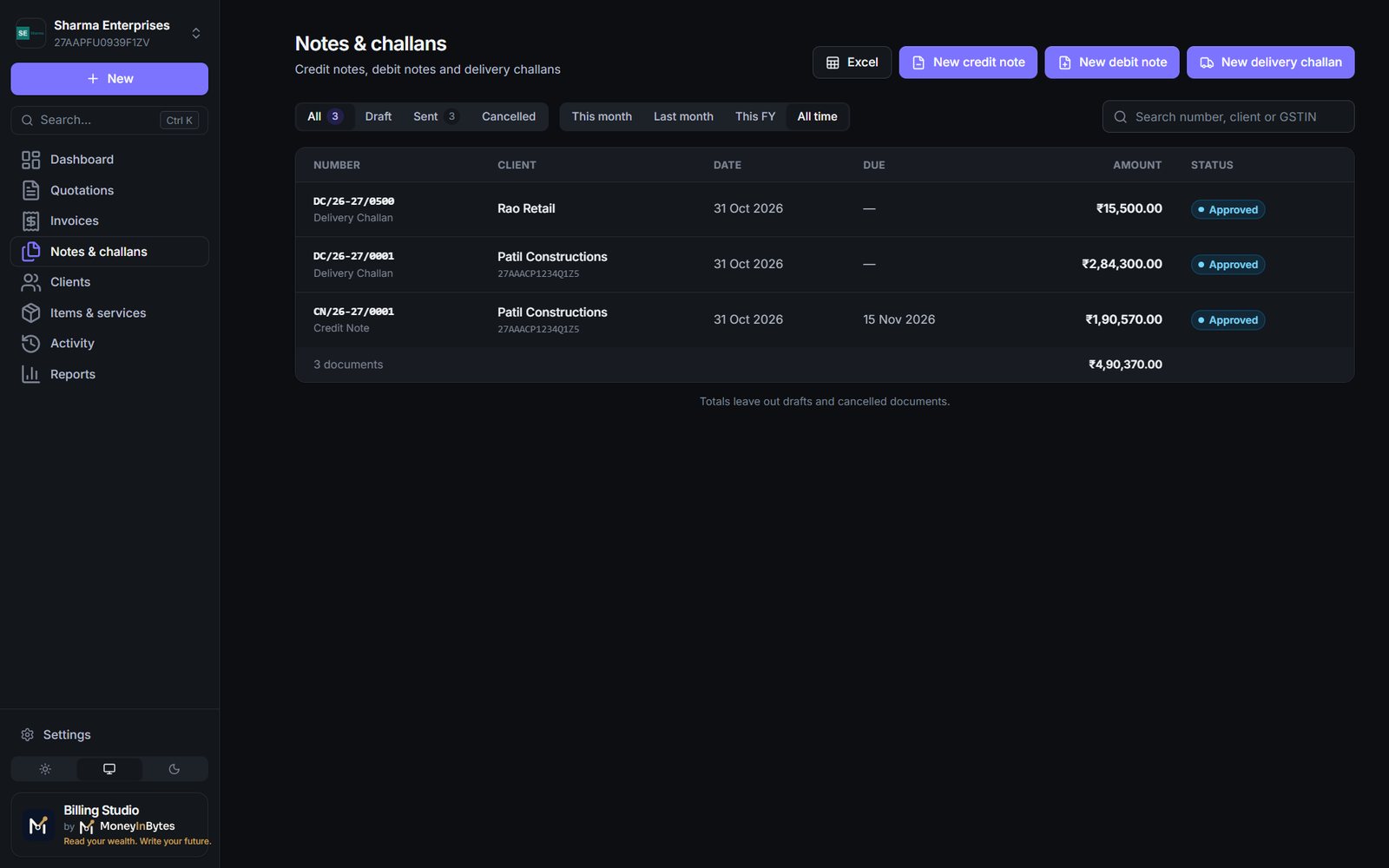
Credit notes, debit notes and delivery challans

Made from the invoice they belong to, so returns, extra charges and goods sent without a bill are always linked and numbered.

  • One click from the invoice
  • Credit notes are taken off your sales totals
  • Cancelled numbers are never reused
Billing Studio: Who owes you, at a glance
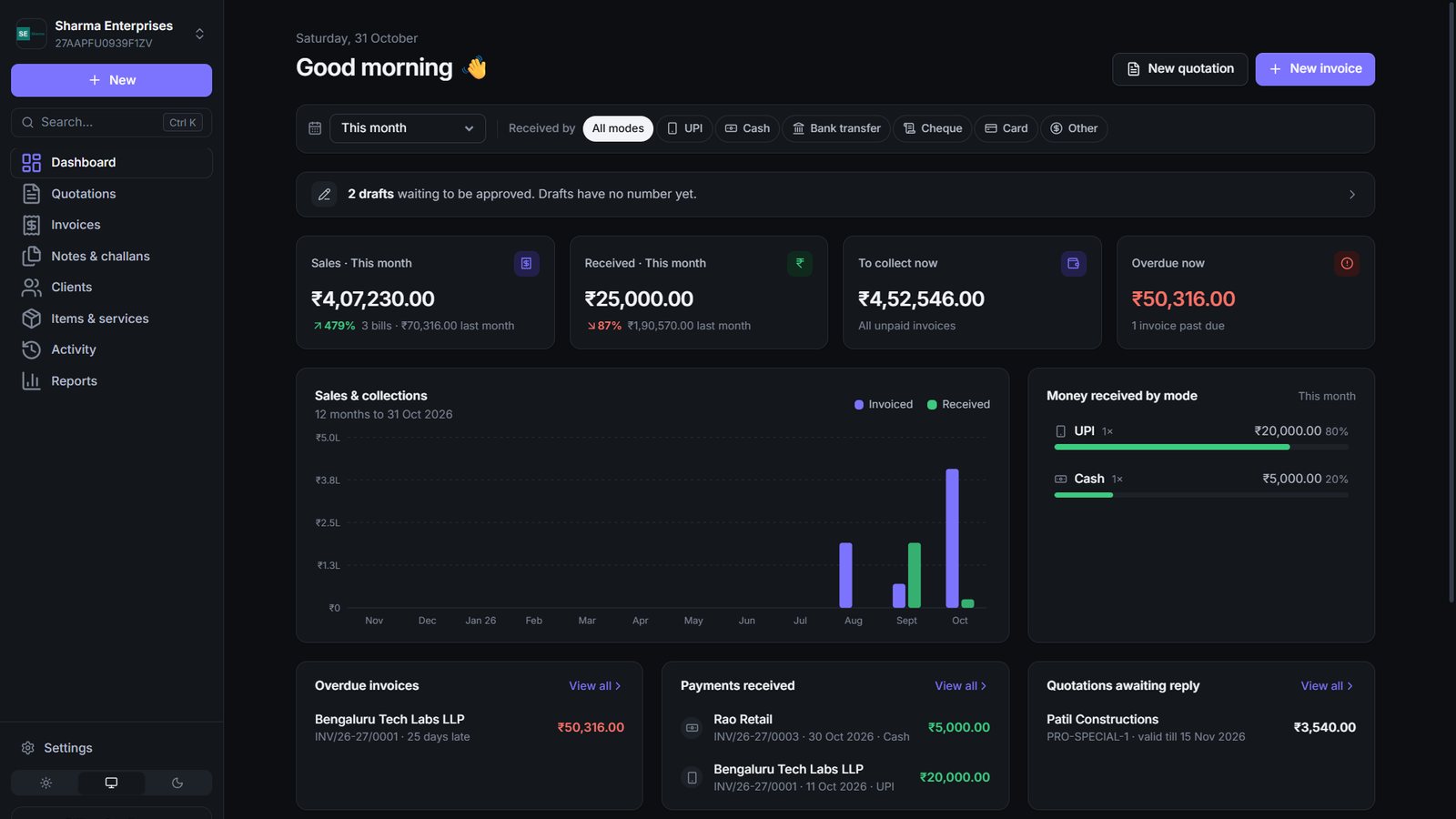
Dashboard

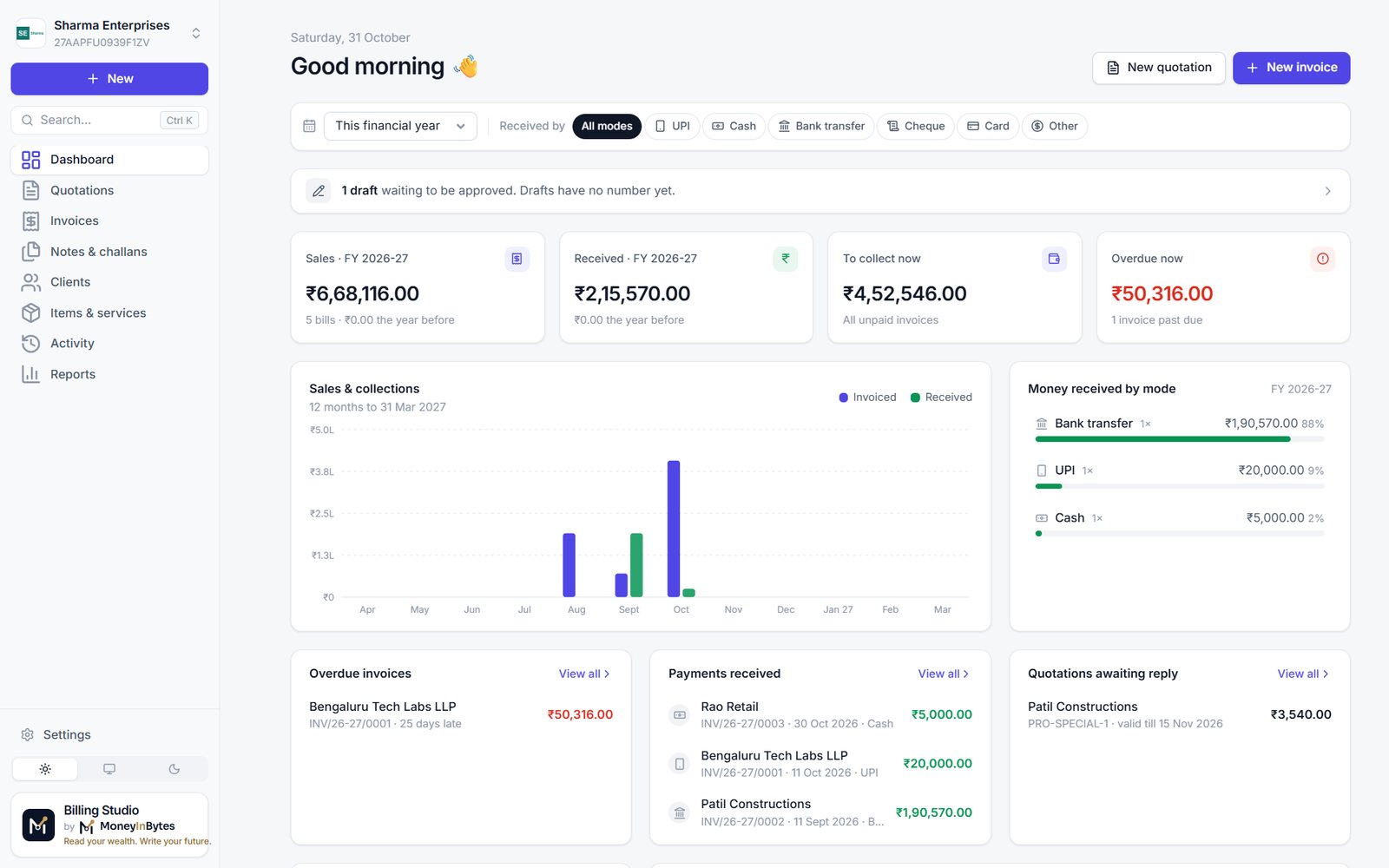
Who owes you, at a glance

Sales and money received this month or year, what is still to collect, what is overdue and by whom, in light or dark.

  • Payments by UPI, cash, bank, cheque or card
  • Sales, GST and HSN summary for any period
  • A sales register for your CA in one click
Price

Get the Billing Studio

Coming soon. Prices in US dollars, one-time, no subscription.

Billing Studio

Every GST document a small business sends, worked out for you and ready as a PDF to email or WhatsApp.

India only
one-time payment · yours to keep
Coming soon
  • Tax invoices, bills of supply, quotations and proforma invoices
  • Credit notes, debit notes and delivery challans, made from an invoice in one click
  • GST worked out for you: CGST and SGST or IGST from the place of supply, cess, discounts and round-off
  • GSTIN check, HSN and SAC suggestions, amount in words
  • PDFs with your logo, colour, bank details and a UPI QR code
  • Send by email from your own address or by WhatsApp
  • Payments by UPI, cash, bank, cheque or card; overdue bills at a glance
  • Sales, GST and HSN summary, and a sales register for your CA
  • Automatic daily backup; numbers never reused; permanent history

Windows 10 or 11 (64-bit). A portable app: nothing to install, no account, and it works offline (the internet is used only to send an email or open WhatsApp). Made for businesses in India: GST documents in rupees. No e-invoice (IRN) or GSTR-1 file yet: give your CA the sales register.

We make it right

If something is wrong with the product, we fix it or replace it. If your payment went wrong, we refund it.

Yours to keep

Download right after payment and again later from the link in your receipt: up to 10 downloads per purchase.

Your books stay yours

Every invoice and PDF is saved in your Documents folder. Nothing is uploaded anywhere.

Before you buy

Will it work on my computer?

A 10-second check that saves you a wasted purchase.

Works with

  • Windows 10 or 11 (64-bit)
  • Businesses in India, GST in rupees
  • Works offline; email and WhatsApp when you choose

Does not work with

  • Mac (not yet)
  • Phones and tablets
  • E-invoice (IRN), e-way bills and filing returns

Your CA files the returns: Billing Studio gives them the sales register and the GST and HSN summary.

Who it is for

Made for

  • Shops, traders, distributors and service businesses registered for GST in India
  • Businesses on composition that issue bills of supply
  • Anyone who sends quotations and invoices and wants to stop doing the GST by hand
  • A Windows 10 or 11 computer (64-bit)
After you buy

Up and running in minutes

  1. Right-click the downloaded ZIP and choose Extract All.
  2. Open the extracted folder and double-click Billing Studio.
  3. If Windows shows "Windows protected your PC", click More info, then Run anyway (the app is not code-signed yet).
  4. Enter your business name, GSTIN and address once, then click New invoice.
Questions

Good to know

Is there a monthly or yearly fee?

No. You pay once and keep using it. There is no account to create.

Does it work without the internet?

Yes. Making documents, PDFs, reports and backups all work offline. The internet is used only when you send an email or open WhatsApp.

Can it make e-invoices (IRN) or file my GST returns?

Not yet. Billing Studio makes your GST documents and the summaries for returns; your CA files them using the sales register and the GST and HSN summary it gives you. If your turnover needs e-invoicing, please wait for a later version.

Where is my data kept?

In your Documents folder, under Billing Studio: every PDF named by its number and client, the records, and a backup made every day (the last 30 are kept). Copy the Backups folder to a pen drive or Google Drive for extra safety.

Does it work on a Mac?

Not yet. Billing Studio runs on Windows 10 and 11 (64-bit). A Mac version will be listed here when it is ready.

Windows says "Windows protected your PC". Is that normal?

Yes, the first time you open it, because the app is not code-signed yet. Click More info, then Run anyway.

Why is the price different in my country?

Prices are set for each region so people everywhere can afford them. The price you see is for the country where you live and pay from. The India price can be paid only with Indian payment methods (UPI, Indian cards and netbanking).

How do I get my files?

Right after payment the download button appears on the thank-you page, and your receipt email has a button that gets your files again later. Each purchase includes up to 10 downloads.

Can I get a refund?

Our products are digital and delivered instantly, so once a product is delivered it is not refunded. If something is wrong with the product, we fix it or replace it, and if we cannot do either within 14 days of your request, we refund you. If your payment went wrong (money taken but no order, or charged twice), we refund it. Your legal rights in your country always apply. See the Refund Policy for the details.

Which payment methods can I use?

Payments are handled by Razorpay: cards, UPI, netbanking and wallets in India, and international cards elsewhere. We never see or store your card details.

Still unsure? Write to us. We reply within 2 working days.

Send your next invoice from Billing Studio

A minute for a GST invoice, one click for the month's summary, and your books on your own computer.

Coming soon · India only
  • Instant download
  • Pay once
  • Secure checkout by Razorpay