Pay onceno subscription, ever150,000transactions tested in Money Command Center0 uploadsyour numbers stay on your computerData Checkfinds wrong or missing entries for you66 lessonsin the Technical Analysis Study LabInstantdownload right after paymentRazorpaysecure checkout: UPI, cards, netbankingYour currencyrupees, dollars and more
MoneyInBytes - Read your wealth. Write your future. Buy now
ToolsMoney Command Center

Your whole money life, in one command center.

Track spending, plan budgets, pay off loans faster and follow your investments and goals in one Excel workbook that does the maths for you. Pro adds an interactive web dashboard built from your own numbers.

  • See where your money goes, every month
  • Plan loan payoffs and goals before you commit
  • Every number stays on your own computer

From $9one-time price · no subscription

Needs the Excel desktop app · Check yours

Watch the overview
150,000transactions tested, so it stays fast for years
10interactive web dashboard sections in Pro
1payment. No subscription, ever
0uploads: no account, no cloud, no tracking
The problem

Money slips away when you can't see it

  • Salary arrives, and by the 20th you are not sure where it went.
  • Loan EMIs feel endless, and you can't tell what paying a little extra would change.
  • Budgeting apps want a monthly fee and your bank data on their servers.
The answer

Money Command Center

Money Command Center turns the entries you type (or paste from a bank statement) into a clear monthly picture, a loan plan and goals you can test, all inside a workbook you own.

See how it works
Inside the product

Real screens. Real features.

Every picture below is a screen from Money Command Center with its demo data. Click one to see it full size.

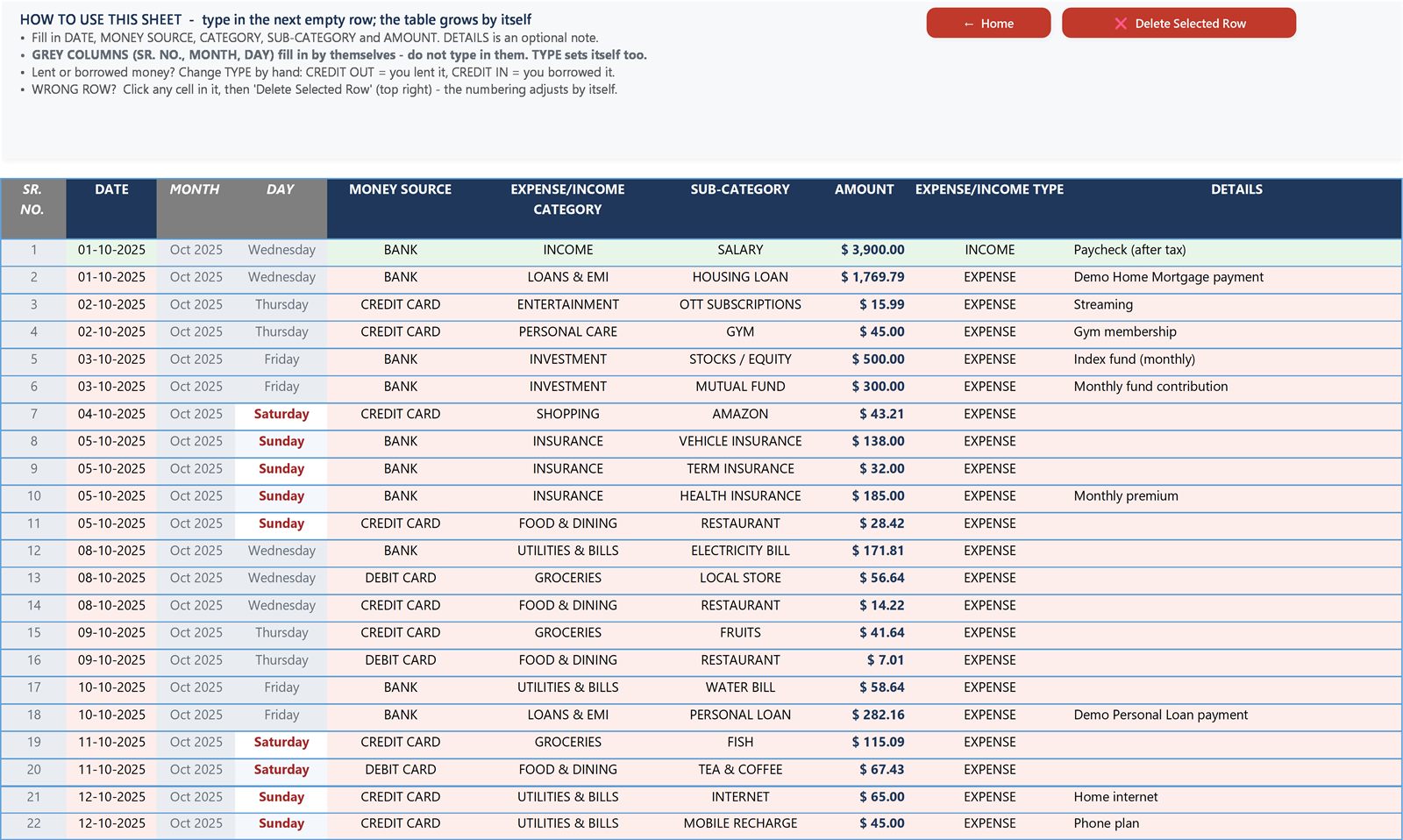
Money Command Center: Log a transaction in seconds
Daily tracking

Log a transaction in seconds

Type the date, category and amount in the next empty row. The month, the day and the type fill themselves, and the table grows by itself.

  • Your own categories and sub-categories
  • Paste a whole bank statement at once (Standard and Pro)
  • Data Check lists wrong or missing entries, each with a link to the cell
  • Stays quick with 150,000 entries
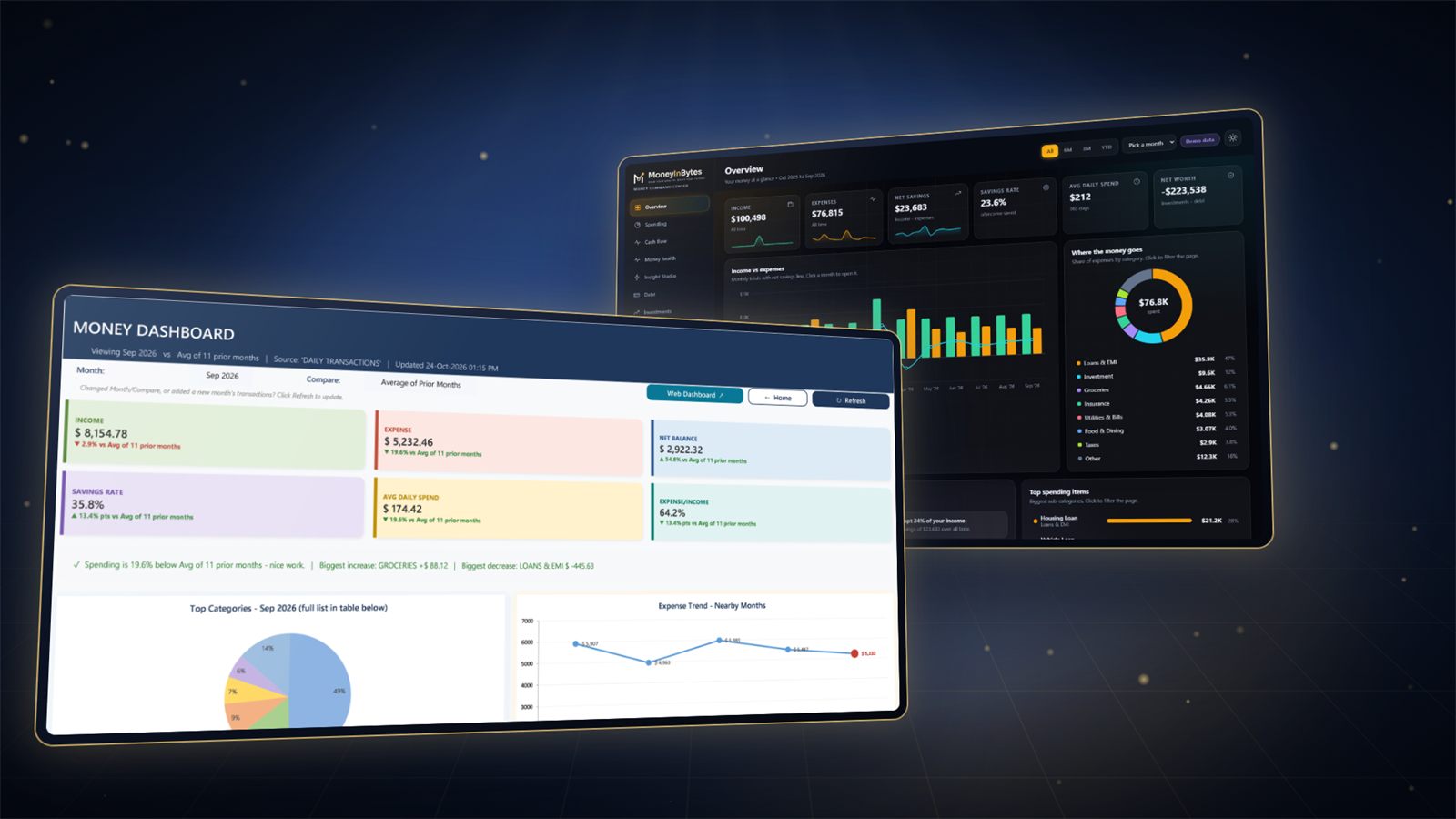
Money Command Center: Know your month at a glance
Monthly dashboard

Know your month at a glance

Pick a month and refresh. Income, spending, savings rate and average daily spend appear, each compared with your own average, plus a plain-language summary of what changed.

  • Top categories and spending trend
  • Compare any month with your past months
  • One click from the Home screen
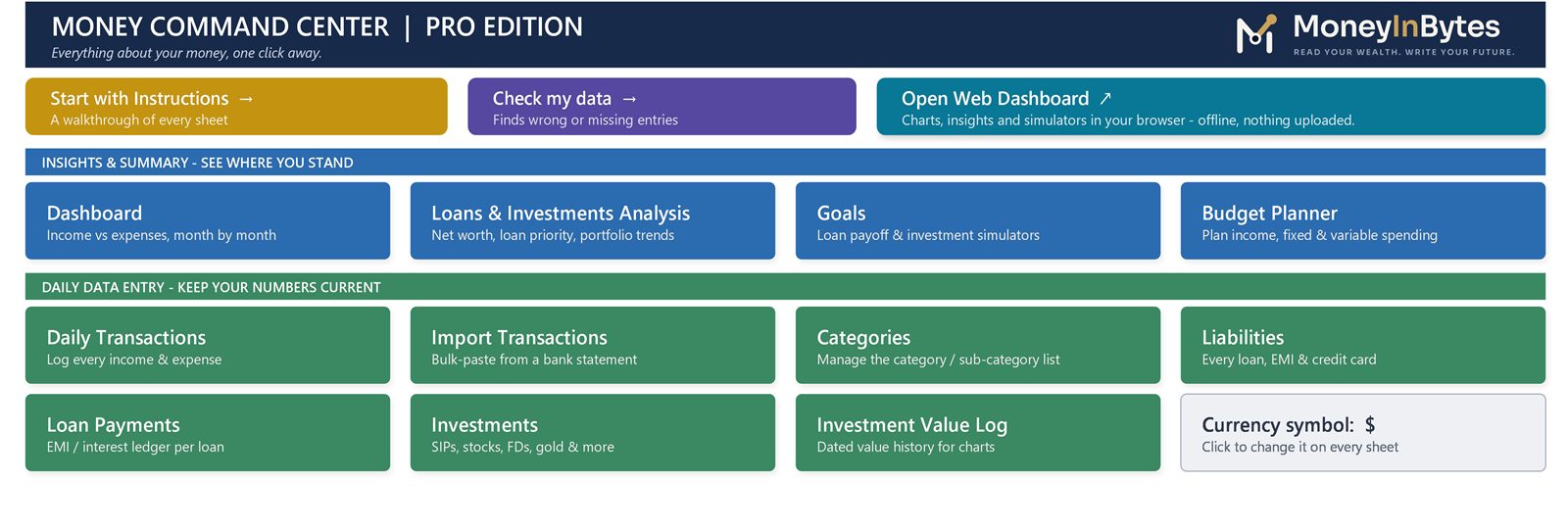
Money Command Center: Everything one click away
Home screen

Everything one click away

A single Home screen links every part of the workbook, with a Start Here guide for your first ten minutes. No Excel skills needed.

  • Clear sections for insights and daily entry
  • Currency symbol of your choice
  • A Demo workbook to explore first
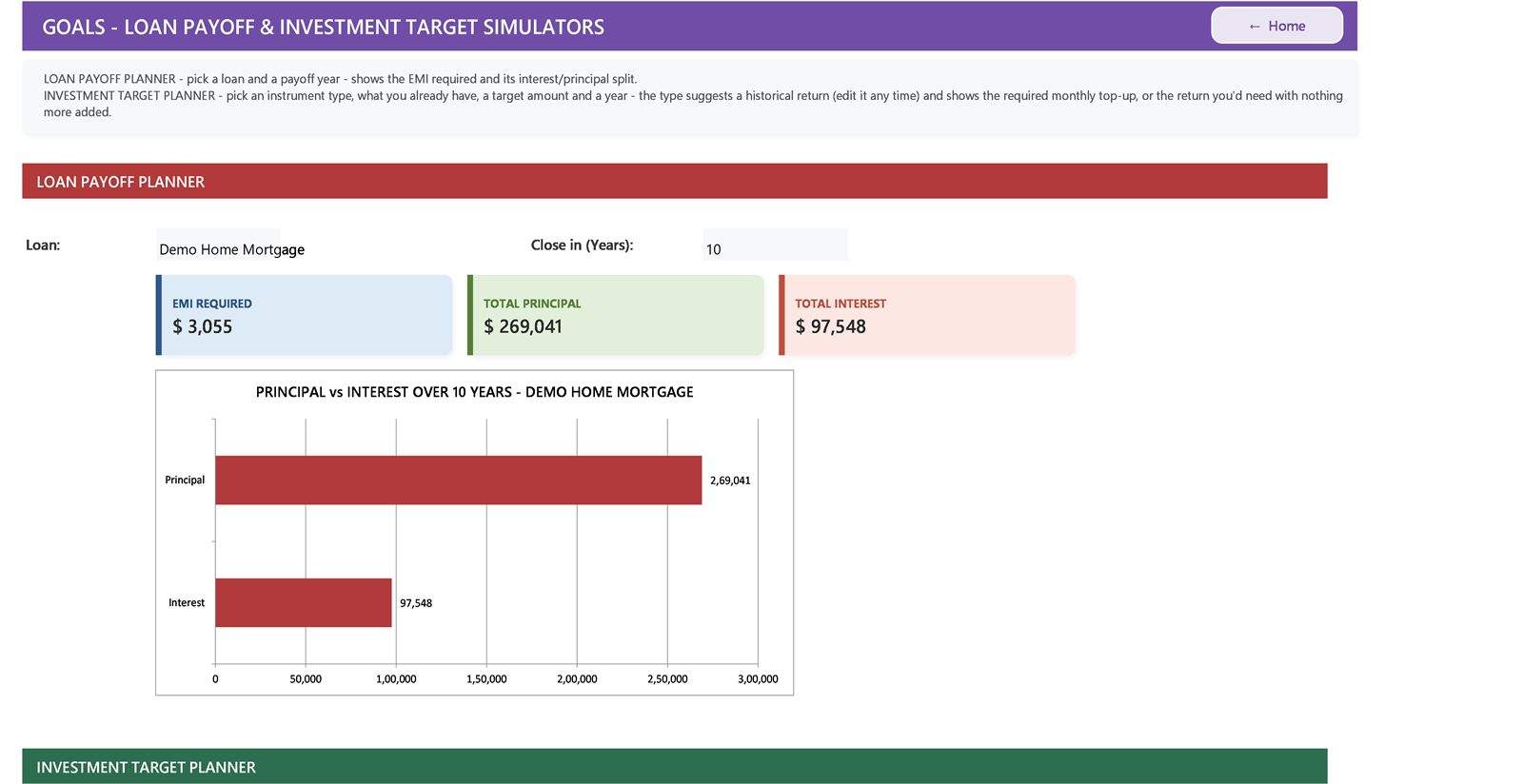
Money Command Center: Test a plan before you commit
GoalsStandard and Pro

Test a plan before you commit

Pick a loan and a payoff year to see the EMI it needs and the interest it costs. Set an investment target and see the monthly amount that reaches it.

  • Loan payoff planner
  • Investment target planner
  • Budgets, liabilities and investments alongside
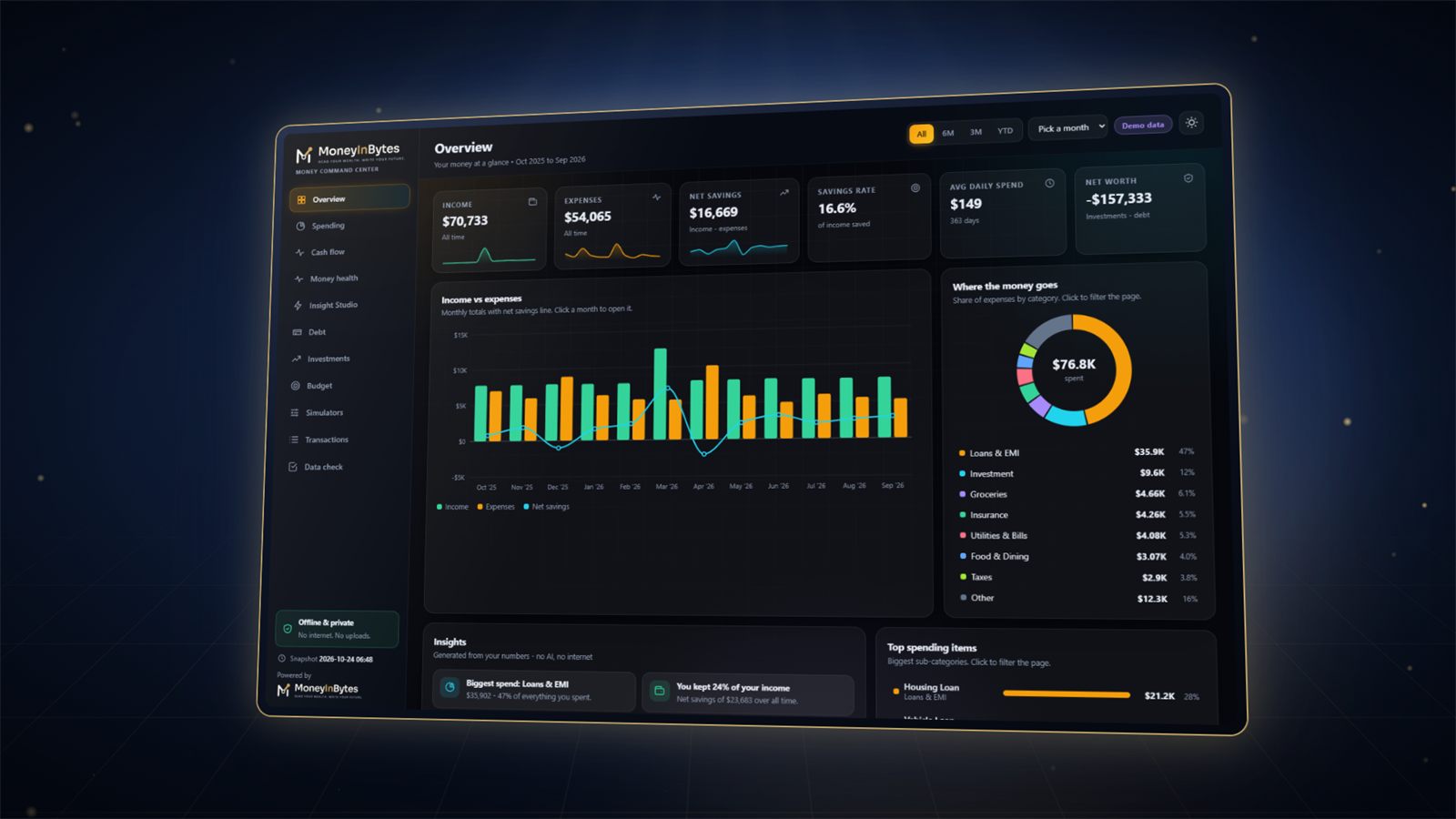
Money Command Center: Your numbers as an interactive dashboard
Web dashboardPro

Your numbers as an interactive dashboard

One click turns your workbook into a modern web dashboard: ten sections from overview to transactions. Click any chart to narrow the page to it.

  • Spending, cash flow, debt, investments, budget
  • Money Health and Insight Studio
  • Opens offline in your browser; sends nothing anywhere
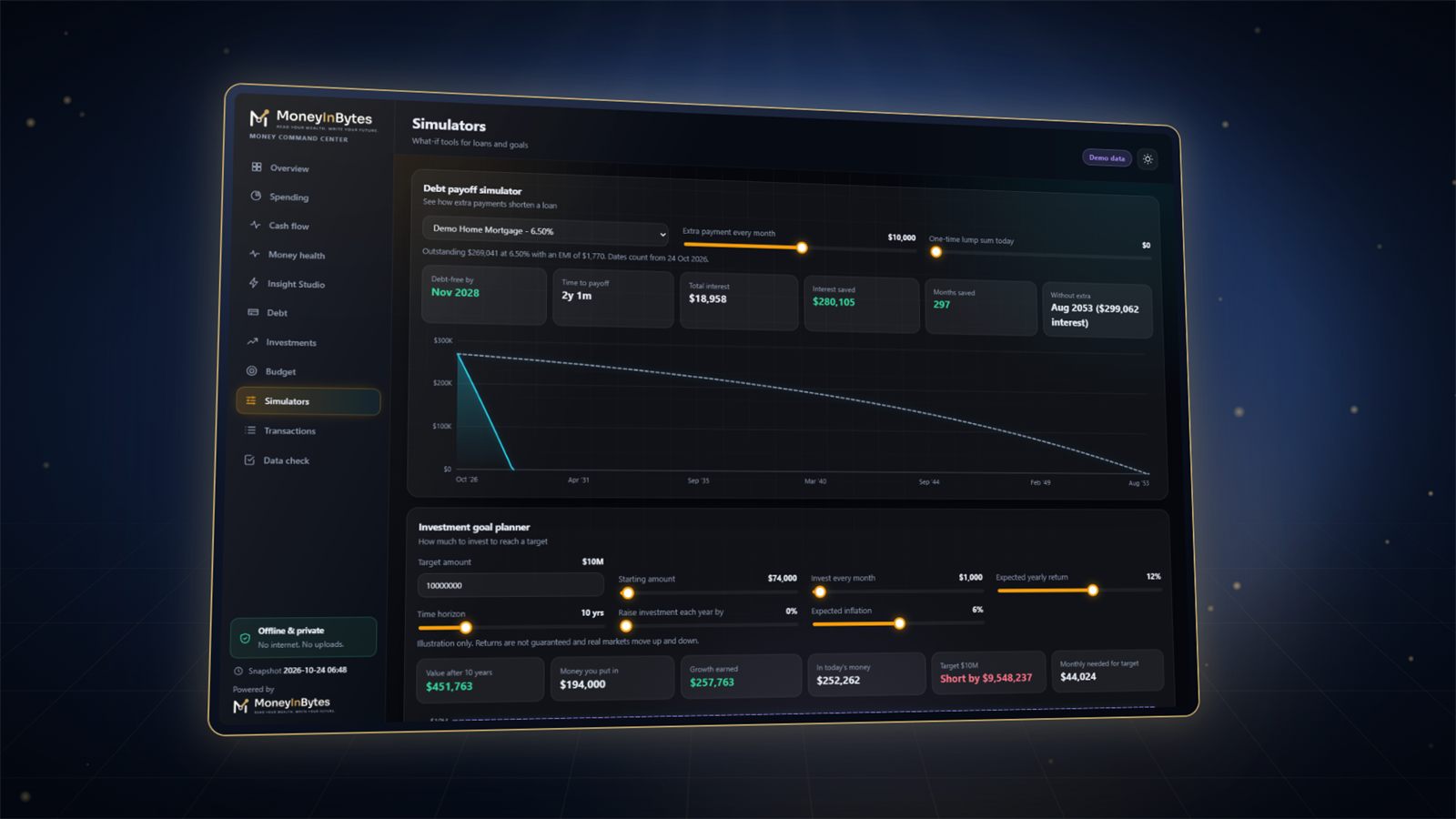
Money Command Center: What if you paid a little extra?
SimulatorsPro

What if you paid a little extra?

Slide an extra monthly payment or a lump sum and watch the debt-free date and interest saved change. Plan an investment goal with inflation in view.

  • Debt payoff simulator
  • Investment goal planner
  • Illustrations only, never promises
Full walkthrough

Watch it work, start to finish

A guided tour of Money Command Center with demo data, so you know exactly what you are buying.

Watch the walkthrough

Or try the live dashboard yourself

Editions

Choose the edition that fits you

Prices in US dollars, one-time. No subscription. Instant download.

Basic

Track every expense and see your month at a glance.

$9
one-time payment · yours to keep
  • Home screen with one-click navigation
  • Daily Transactions, tested with 150,000 entries
  • Dashboard: income, spending, savings rate, top categories
  • Your own categories
  • Currency symbol of your choice
  • Step-by-step Start Here guide and a Demo workbook

Standard

The complete money system: budgets, loans, investments and goals.

$19
one-time payment · yours to keep
  • Everything in Basic
  • Budget Planner
  • Loans, Liabilities and payment tracking
  • Investments
  • Goals: test a plan before you commit
  • Analysis of spending over time
  • Import a bank statement without typing
Compare every feature
What each edition of Money Command Center includes
FeatureBasic$9Standard$19Pro$29
Home screen with one-click navigation
Daily Transactions, tested with 150,000 entries
Dashboard: income, spending, savings rate, top categories
Your own categories
Currency symbol of your choice
Step-by-step Start Here guide and a Demo workbook
Budget Planner
Loans, Liabilities and payment tracking
Investments
Goals: test a plan before you commit
Analysis of spending over time
Import a bank statement without typing
Interactive web dashboard in ten sections, offline
Click any chart to narrow a section to it
Simulators: what if you paid extra on a loan?
Insight Studio and Money Health on the web page
Follows your workbook as you change it

The Microsoft Excel desktop app on Windows or Mac (Microsoft 365, Excel 2024, 2021 or 2019). Not for Excel on the web, phones or Google Sheets.

Wrong edition? Switch.

Write within 7 days and we move you to the edition you need. You pay only the difference.

We make it right

If something is wrong with the product, we fix it or replace it. If your payment went wrong, we refund it.

Yours to keep

Download right after payment and again later from the link in your receipt: up to 10 downloads per purchase.

Before you buy

Will it work on my computer?

A 10-second check that saves you a wasted purchase.

Works with

  • Microsoft Excel desktop app on Windows
  • Microsoft Excel desktop app on Mac
  • Microsoft 365, Excel 2024, 2021 or 2019

Does not work with

  • Excel on the web
  • Phones and tablets
  • Google Sheets or LibreOffice

Not sure? Open "See it in action": the live dashboard preview runs in any browser.

Who it is for

Made for

  • Anyone who wants to know where the money goes each month
  • Households paying off a home, car or personal loan
  • People building investments towards a goal
  • Anyone with the Microsoft Excel desktop app on Windows or Mac (Microsoft 365, Excel 2024, 2021 or 2019)
After you buy

Up and running in minutes

  1. Windows: right-click the downloaded ZIP, choose Properties, tick Unblock at the bottom and press OK, then right-click it again and choose Extract All. (Unblock first: Windows switches off the macros of downloaded files.)
  2. Mac: double-click the downloaded ZIP in Finder. It unpacks into a folder next to it.
  3. Open the workbook in 1-YOUR-WORKBOOK in the Microsoft Excel desktop app and allow its macros: Enable Content on Windows, Enable Macros on a Mac.
  4. Type a few entries on Daily Transactions, open Dashboard, pick the month and click Refresh.
Questions

Good to know

How do I open it on Windows and on a Mac?

Use the Microsoft Excel desktop app (Microsoft 365, Excel 2024, 2021 or 2019). Windows: right-click the ZIP, Properties, tick Unblock, OK, then Extract All; open the workbook and click Enable Content. Mac: double-click the ZIP in Finder, open the workbook and click Enable Macros. Excel on the web, phones and Google Sheets cannot run its buttons.

Which edition should I choose?

Basic covers daily tracking and the monthly dashboard. Standard is the complete money system with budgets, loans, investments, goals and analysis. Pro adds the interactive web dashboard with simulators and Insight Studio.

Do I need to be good at Excel?

No. You type entries in a ready-made table and press buttons; the workbook does the formulas, charts and summaries. A Start Here guide and a Demo workbook walk you through it.

Can I use it in dollars or another currency?

Yes. On the Home sheet click Currency symbol and type your own. Amounts are shown in your symbol; nothing is converted.

Is my data uploaded anywhere?

No. Your workbook stays on your computer. There is no account and no sign-in.

Bought the wrong edition?

Write to us within 7 days and we will move you to the edition you need; you pay only the difference.

Why is the price different in my country?

Prices are set for each region so people everywhere can afford them. The price you see is for the country where you live and pay from. The India price can be paid only with Indian payment methods (UPI, Indian cards and netbanking).

How do I get my files?

Right after payment the download button appears on the thank-you page, and your receipt email has a button that gets your files again later. Each purchase includes up to 10 downloads.

Can I get a refund?

Our products are digital and delivered instantly, so once a product is delivered it is not refunded. If something is wrong with the product, we fix it or replace it, and if we cannot do either within 14 days of your request, we refund you. If your payment went wrong (money taken but no order, or charged twice), we refund it. Your legal rights in your country always apply. See the Refund Policy for the details.

Which payment methods can I use?

Payments are handled by Razorpay: cards, UPI, netbanking and wallets in India, and international cards elsewhere. We never see or store your card details.

Still unsure? Write to us. We reply within 2 working days.

Take control of your money this week

Pay once, download in a minute, and see your first monthly picture tonight.

  • Instant download
  • Pay once
  • Secure checkout by Razorpay

Money Command Center

One-time payment. Instant download.

Choose your edition
Your download link and receipt go here. Any email provider works.
The country of your card or bank. Prices are set for each region.
Total, one-time —

Payments by Razorpay. We never see or store your card details.