Pay onceno subscription, ever150,000transactions tested in Money Command Center0 uploadsyour numbers stay on your computerData Checkfinds wrong or missing entries for you66 lessonsin the Technical Analysis Study LabInstantdownload right after paymentRazorpaysecure checkout: UPI, cards, netbankingYour currencyrupees, dollars and more
MoneyInBytes - Read your wealth. Write your future. Buy now
Coming soonInvestment Analyzer

Every investment you own, on one screen.

Mutual funds, shares, NPS, FDs, PPF, EPF, gold and property for the whole family, in one Excel workbook. Import your statements, update prices in one click, and see what it is all worth, the real yearly return and where the money sits.

  • Import your CAS and broker files instead of typing
  • See the real yearly return (XIRR) of everything
  • Every number stays on your own computer

$19one-time price · no subscription

Coming soon. Look around now: buying opens on this page shortly.

Needs the Excel desktop app on Windows · Check yours

Investment Analyzer screenshot
28investment types, from mutual funds to property
1click to update fund, share and NPS prices
11sections in the interactive web dashboard
0uploads: no account, no cloud, no tracking

Please note: Tracking and calculation only. The Investment Analyzer recommends no fund, share or other investment and gives no investment, tax or legal advice. Tax figures are estimates: confirm with your CA.

The problem

Your money is spread across too many places

  • Funds on two apps, shares with a broker, FDs at the bank, PPF at the post office: no single total.
  • The app shows a gain, but you can't tell what your money really earned each year.
  • Maturities, SIPs and tax on a sale are easy to lose track of.
The answer

Investment Analyzer

The Investment Analyzer brings every holding into one workbook, keeps prices up to date with a click, and works out the value, the real return, the mix and the tax estimates for you.

See how it works
Inside the product

Real screens. Real features.

Every picture below is a screen from Investment Analyzer with its demo data. Click one to see it full size.

Investment Analyzer: Four buttons do most of the work
Home screen

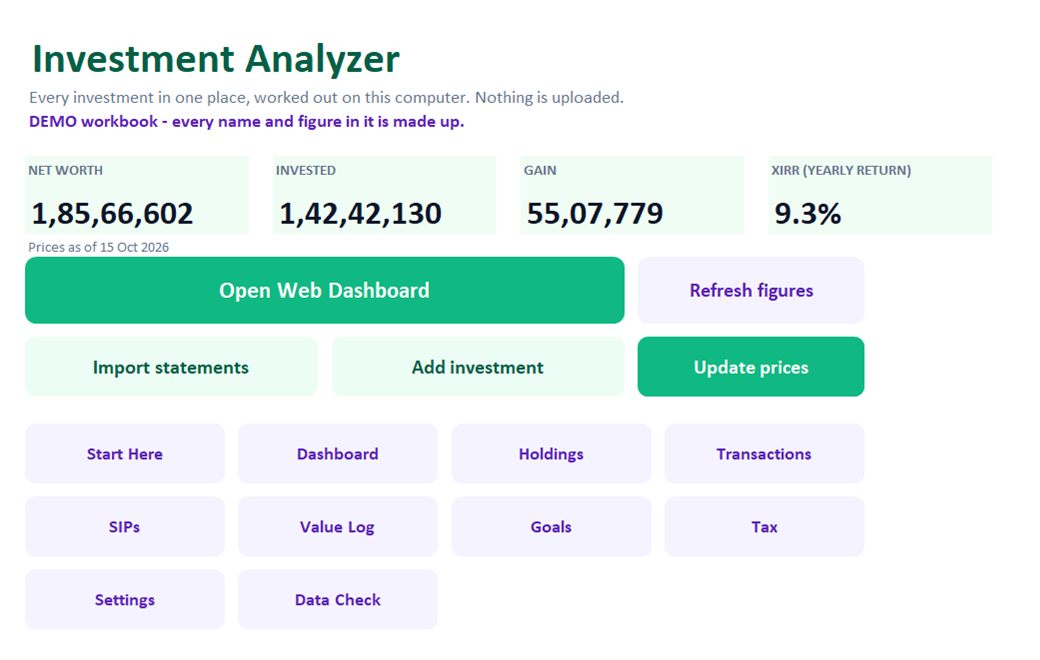
Four buttons do most of the work

Import statements, Update prices, Add investment and Open Web Dashboard. Net worth, money put in, gain and yearly return sit on top.

  • Imports CAS PDFs (CAMS, KFintech, NSDL, CDSL) and broker exports
  • Prices from AMFI, BSE and NPS Trust in one click
  • SIPs fill themselves in every month
Investment Analyzer: Every holding, with its real return
Holdings

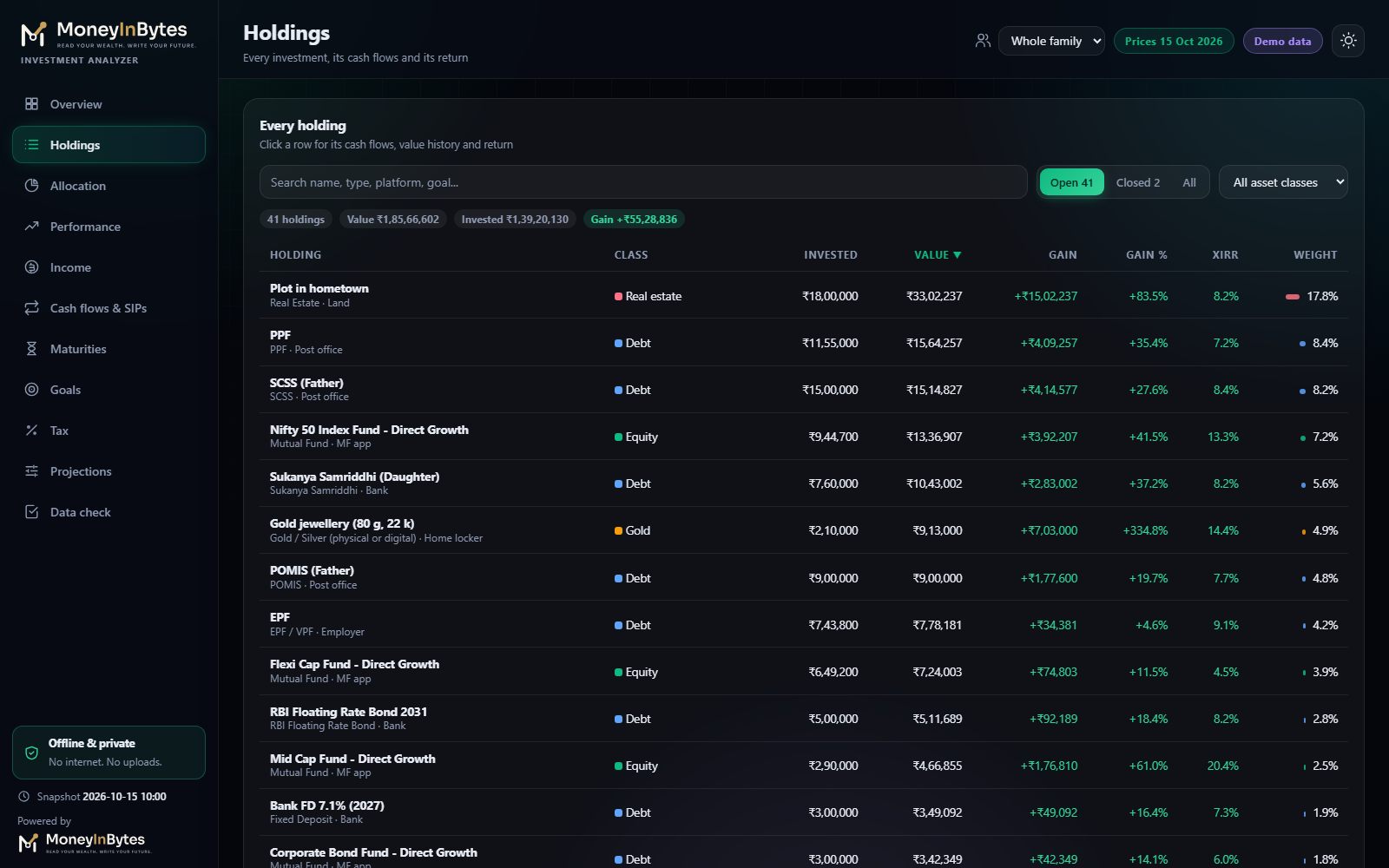
Every holding, with its real return

Each investment with what you put in, what it is worth today, the gain and its XIRR: the yearly return that counts when every rupee went in.

  • Click a row for its cash flows and value over time
  • Filter by family member, class or platform
  • Deposits, PPF and small savings grow by their own rates
Investment Analyzer: See where the money sits
Allocation

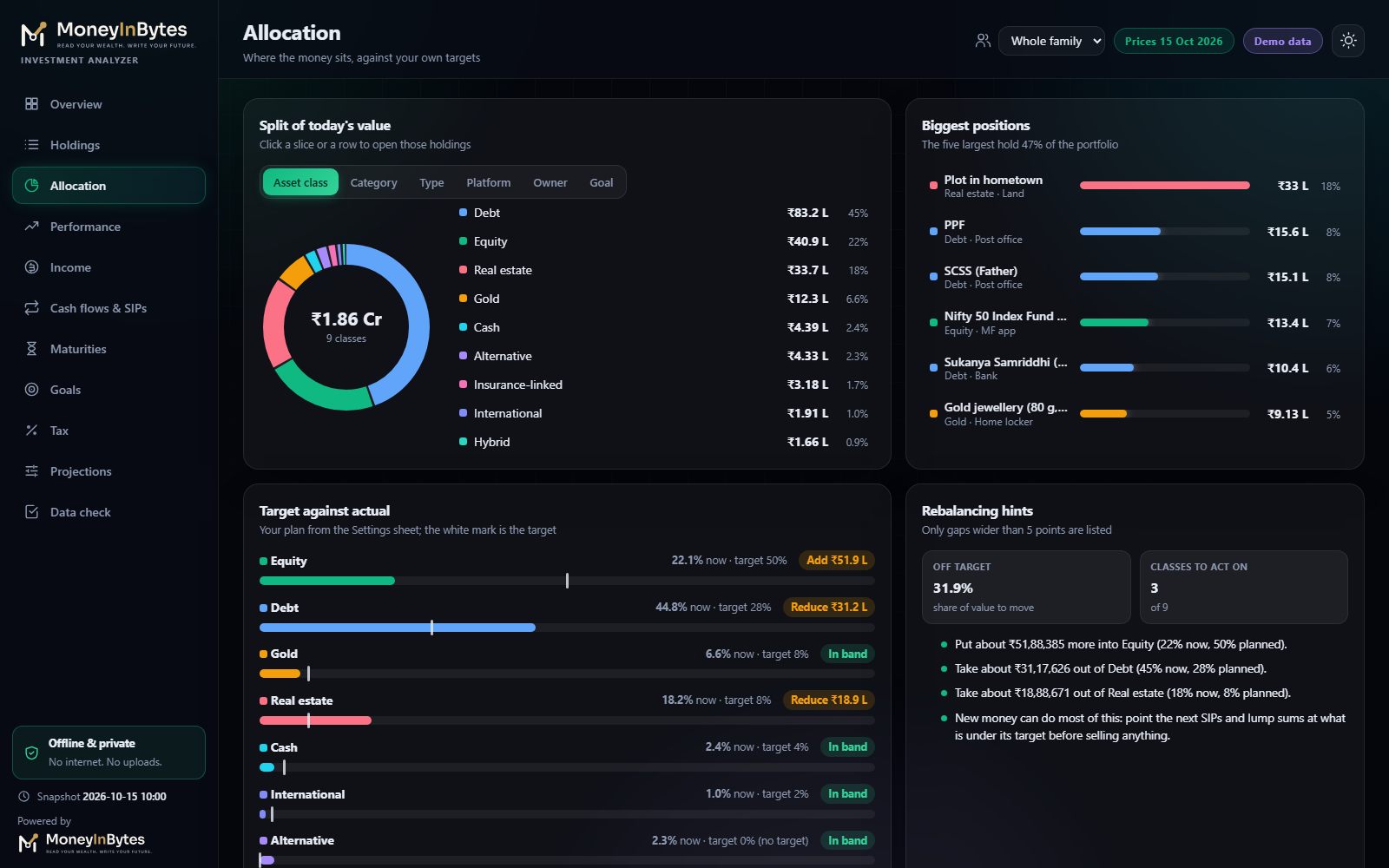
See where the money sits

The split of today's value by asset class, category, type, platform, owner and goal, set against the targets you choose.

  • Biggest positions at a glance
  • Gaps to your own target mix
  • Facts only: it never says what to buy or sell
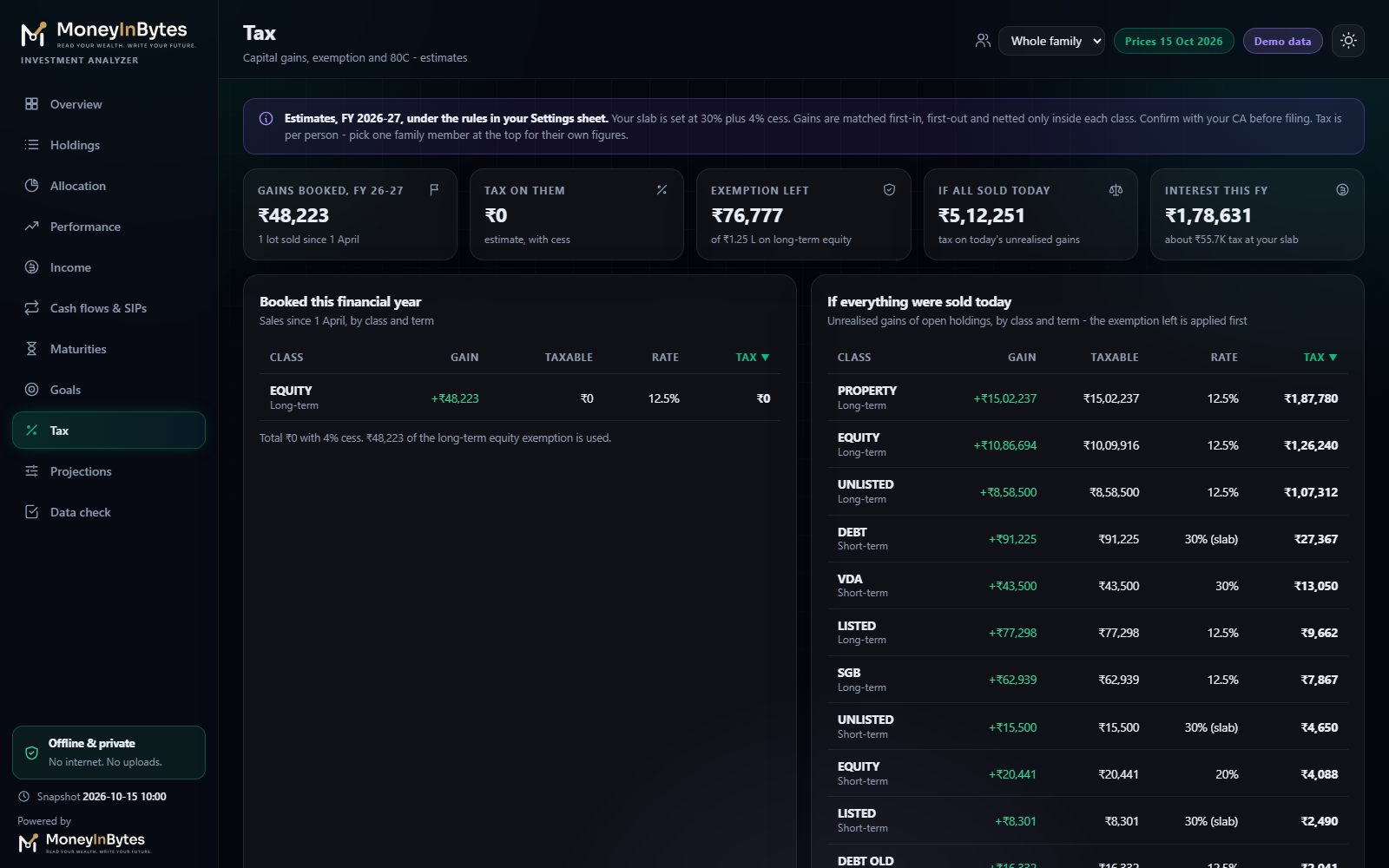
Investment Analyzer: Know the tax before you sell
Tax estimates

Know the tax before you sell

Gains booked this financial year by class, tax on everything if sold today, the long-term equity exemption left and 80C used.

  • First-in, first-out lots from your transactions
  • Rules in the Settings sheet you can update
  • Estimates only: confirm with your CA
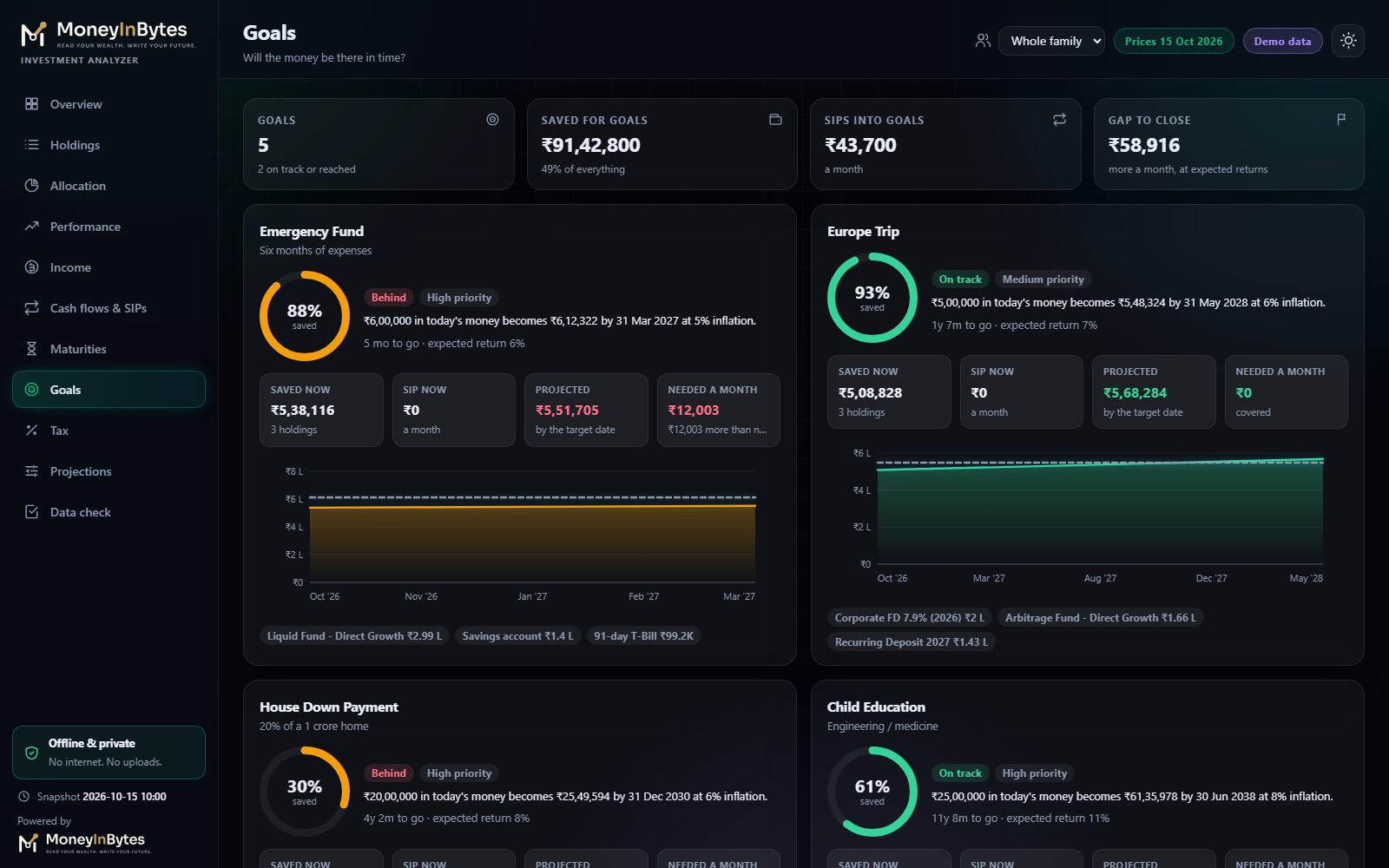
Investment Analyzer: Will the money be there in time?
Goals

Will the money be there in time?

Link holdings and SIPs to each goal and see the projected value by the target date, after inflation, and what more it needs each month.

  • On track or behind, at a glance
  • Projection chart for every goal
  • Maturities calendar for the next 24 months
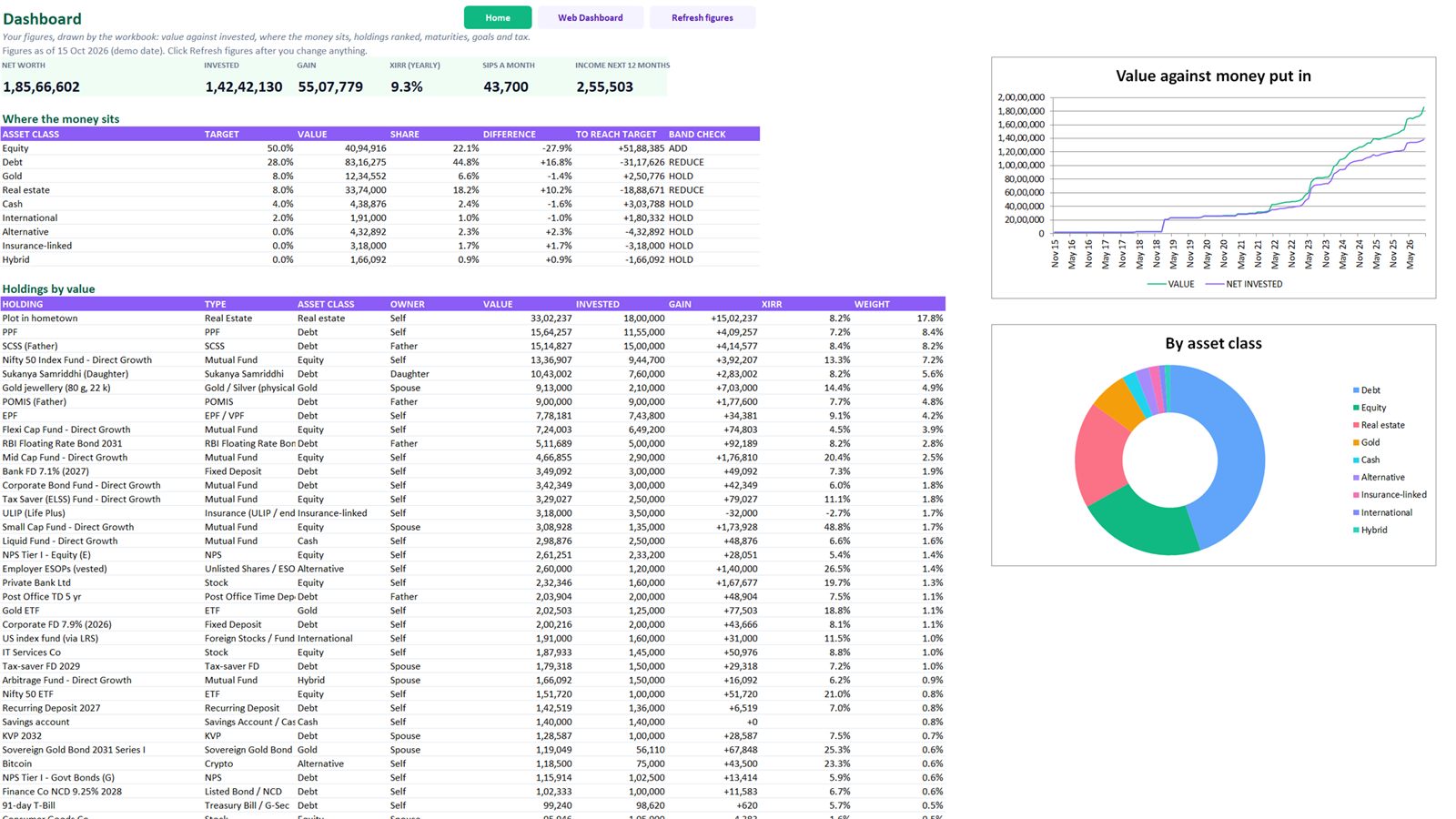
Investment Analyzer: The full picture inside Excel too
Excel dashboard

The full picture inside Excel too

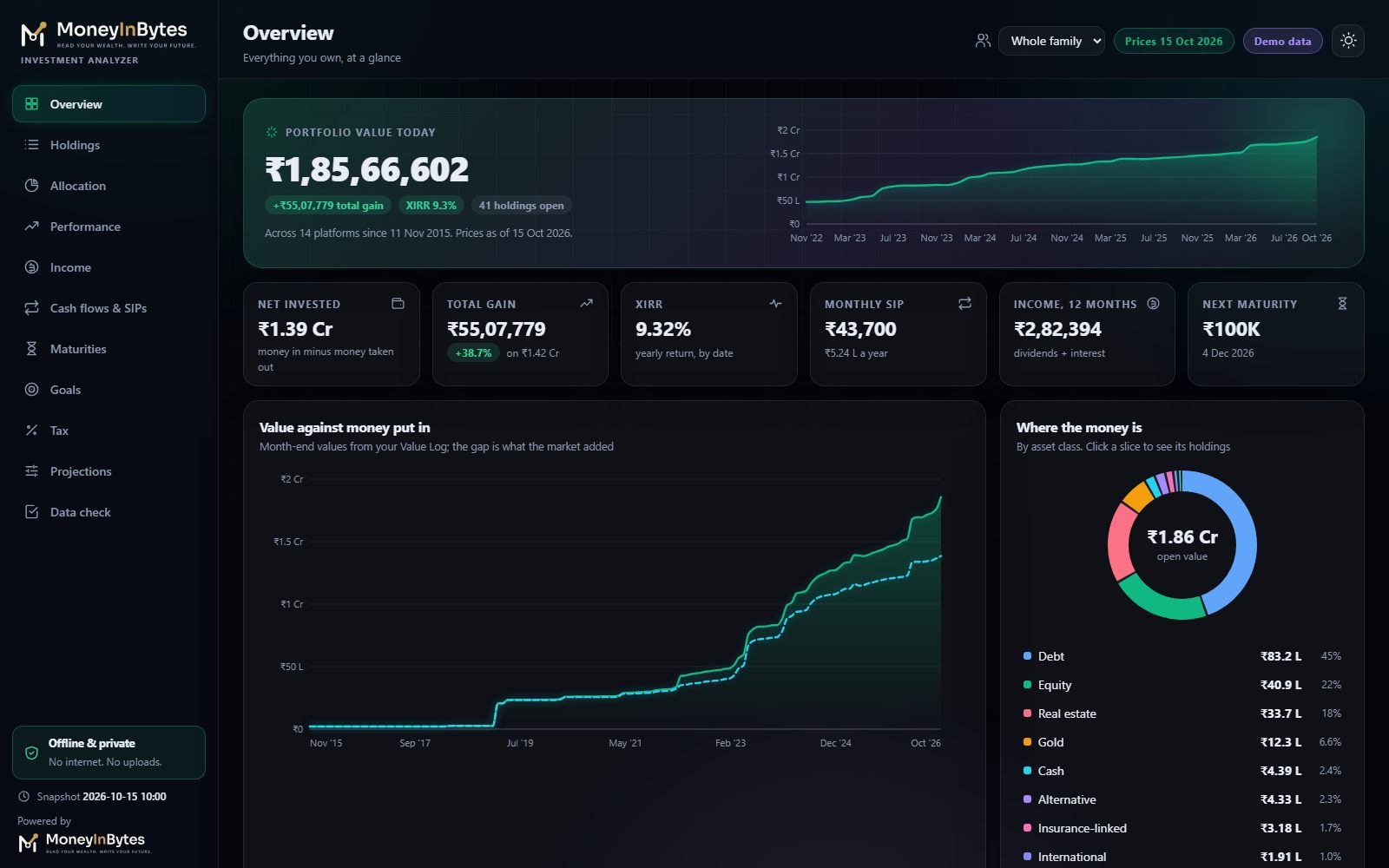
The workbook draws its own dashboard: value against money put in, where the money sits, holdings ranked, maturities, goals and tax.

  • Data Check lists anything to fix
  • A Demo workbook with a fictional family to explore
  • Step-by-step Start Here guide
Price

Get the Investment Analyzer

Coming soon. Prices in US dollars, one-time, no subscription.

Investment Analyzer

Your whole portfolio with almost no typing: import statements, update prices in one click, see the real return.

$19
one-time payment · yours to keep
Coming soon
  • Imports your CAS PDF (CAMS, KFintech, NSDL, CDSL) and broker exports
  • Update prices in one click: mutual funds (AMFI), shares and gold bonds (BSE), NPS
  • 28 investment types, from mutual funds and shares to FDs, PPF, EPF, NPS, gold and property
  • XIRR, the real yearly return, for every holding, class, goal and family member
  • Allocation against your own targets, maturities calendar, goals
  • Capital-gains and 80C estimates for the financial year
  • Interactive web dashboard in eleven sections, offline
  • Data Check and a Demo workbook

The Microsoft Excel desktop app on Windows (Microsoft 365, Excel 2024, 2021 or 2019). Not for Excel on the web, phones or Google Sheets. Made for investments held in India, in rupees: mutual funds, shares, NPS, deposits, PPF, EPF, gold, bonds, property and more.

We make it right

If something is wrong with the product, we fix it or replace it. If your payment went wrong, we refund it.

Yours to keep

Download right after payment and again later from the link in your receipt: up to 10 downloads per purchase.

No account, no tracking

Your holdings stay in your workbook. Update prices only downloads public price files.

Before you buy

Will it work on my computer?

A 10-second check that saves you a wasted purchase.

Works with

  • Microsoft Excel desktop app on Windows
  • Microsoft 365, Excel 2024, 2021 or 2019
  • Investments held in India, in rupees

Does not work with

  • Excel on the web
  • Phones and tablets
  • Google Sheets or LibreOffice

Not sure? Open "See it in action": the live dashboard preview runs in any browser.

Who it is for

Made for

  • Families with investments spread across apps, brokers, banks and the post office
  • Anyone who wants to know what their investments really earn each year
  • People planning goals, maturities and tax on a sale
  • Anyone with the Microsoft Excel desktop app on Windows (Microsoft 365, Excel 2024, 2021 or 2019)
After you buy

Up and running in minutes

  1. Right-click the downloaded ZIP, choose Properties, tick Unblock at the bottom and press OK, then right-click it again and choose Extract All. (Unblock first: Windows switches off the macros of downloaded files.)
  2. Open START-HERE.html in the extracted folder: it walks you through the first ten minutes.
  3. Open the workbook in 1-YOUR-WORKBOOK in the Microsoft Excel desktop app and click Enable Content.
  4. Open 3-IMPORT-HELPER/Import-Helper.html, drop your CAS PDF and broker exports on it and save the import file; then click Import statements on Home.
Questions

Good to know

Which statements can it import?

The consolidated account statement (CAS) PDF from CAMS, KFintech, NSDL or CDSL, and the holdings and trade exports of popular brokers. The Import helper reads them in your browser, on your computer, and makes one file for the workbook's Import button.

Where do the prices come from?

Update prices downloads the public price files of AMFI (mutual funds), BSE (shares, ETFs and gold bonds) and NPS Trust. Nothing about you is sent. Deposits, PPF and small savings grow by their own rates; for property or jewellery you type the value.

Will it tell me what to buy or sell?

No. It tracks and calculates. Allocation is compared only with the targets you set yourself, and it recommends no fund or stock.

Are the tax figures exact?

They are estimates under the rules written in the Settings sheet, which you can update when the rules change. Confirm with your CA before filing.

I live outside India. Can I use it?

It is made for investments held in India, in rupees: Indian mutual funds, shares, NPS, deposits and the rest. If that is what you hold, yes.

Do I need to be good at Excel?

No. You press buttons and fill a short form; the workbook does the formulas, charts and summaries. A Start Here guide and a Demo workbook walk you through it.

Why is the price different in my country?

Prices are set for each region so people everywhere can afford them. The price you see is for the country where you live and pay from. The India price can be paid only with Indian payment methods (UPI, Indian cards and netbanking).

How do I get my files?

Right after payment the download button appears on the thank-you page, and your receipt email has a button that gets your files again later. Each purchase includes up to 10 downloads.

Can I get a refund?

Our products are digital and delivered instantly, so once a product is delivered it is not refunded. If something is wrong with the product, we fix it or replace it, and if we cannot do either within 14 days of your request, we refund you. If your payment went wrong (money taken but no order, or charged twice), we refund it. Your legal rights in your country always apply. See the Refund Policy for the details.

Which payment methods can I use?

Payments are handled by Razorpay: cards, UPI, netbanking and wallets in India, and international cards elsewhere. We never see or store your card details.

Still unsure? Write to us. We reply within 2 working days.

See your whole portfolio this week

Download in a minute, import your statements and see what everything is really worth tonight.

Coming soon · $19 See it in action
  • Instant download
  • Pay once
  • Secure checkout by Razorpay